

OpenLM
Licence Management Software OpenLM
Optimise the software licences in your company now. OpenLM helps you avoid over- and under-licensing.
Licence Management Software OpenLM
Start a free trial
- Licence monitoring
- Control of software licences
- Licence management
- Software with full range of functions
- Test 30 days
Do you know how high your current licence utilisation is?
With OpenLM in a few moments.
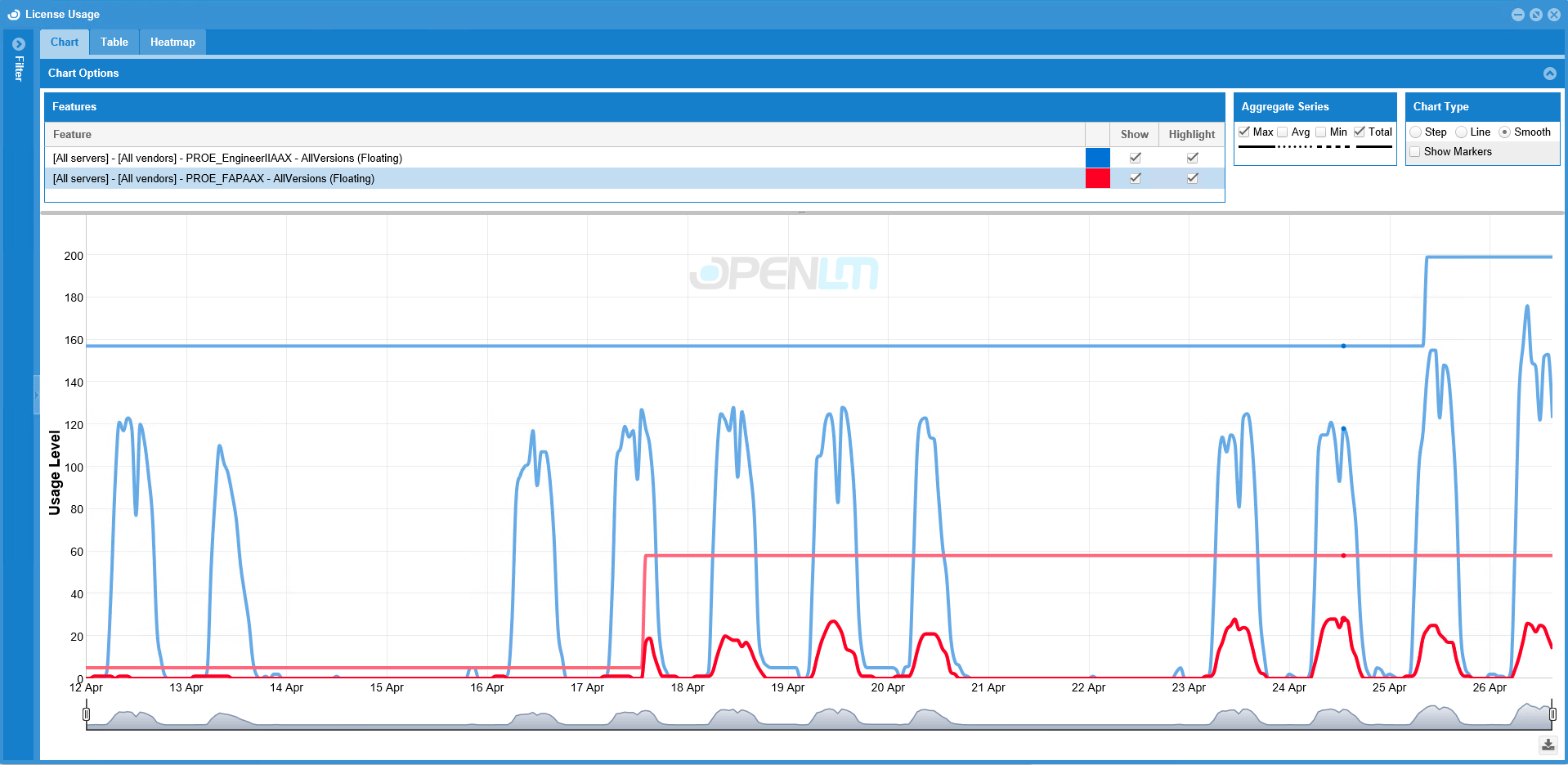
Monitor and analyse the use of software licences in your company and also enforce policies on the use of your network licences.
Why OpenLM?
Full control over your software licences: manage less, use more.



Increase productivity with OpenLM
Provide your engineers with the software solutions they need to work on projects without licence bottlenecks. This way you avoid work interruptions due to under-licensing.

Optimise licence costs for software
Avoid over- and under-licensing. Save significant licensing and maintenance costs through accurate usage analysis and forecasting.

Use data efficiently
By providing information and administering software licences, you can make faster, more informed decisions and thus minimise administrative effort and costs.

Legal and contractual compliance
By monitoring licensing activities, you can ensure data protection-compliant use of your software. Avoid re-licensing through audits of software manufacturers.
Full control over software licences
Important functions for managing your software licences at a glance.
As an intelligent monitoring and management system for software licenses, the license management software OpenLM enables the efficient use and control of licensed software.

Licence utilisation
Detailed reports on the actual license utilization (who / when / how).

Network licenses
Monitor network licences live and in real time.

Unlimited
Unlimited management of license servers, licenses and users.

LDAP interface
LDAP interface (Active Directory) to synchronize user data and group information.

Compatible
Monitoring a wide range of license management systems.
- FLEXlm / Flexnet
- Sentinel RMS (Aspentech SLM)
- Dassault Systèmes Licensing Service (DSLS)
- IBM LUM
- Sentinel HASP
- LM-X, Reprise RLM
- Beta-LM
Mathematica LM (MathLM)
and more.
OpenLM explained in an easy way
Software licence management made easy!
Cost-saving, demand-oriented, careful - in short: OpenLM is the software for optimal licence management. Take advantage of the wide range of options, simplify and optimise licence management in your company.
You are currently viewing a placeholder content from YouTube. To access the actual content, click the button below. Please note that doing so will share data with third-party providers.
More InformationAreas of application of OpenLM
Branches that already use OpenLM for Engineering Licenses.


Automotive

Aerospace & Defence

Mechanical and Plant Engineering

Engineering & Construction

Banks & Insurance

Electrical engineering

Agriculture & forestry

State & local government

Defence

Application examples of the licence management software OpenLM
Our scenarios show you, how an efficient handling of software solutions has been achieved in practice by using OpenLM.
Medium-sized companies
Initial situation
A medium-sized mechanical and plant engineering company with around 800 employees develops specialised machines for the manufacturing industry that are used worldwide. The company has weathered the financial crisis well. By acquiring smaller companies in South America and Asia with specialised expertise, the company is pursuing the declared goal of consolidating its leading global position in this market segment. At the same time, the aim of the acquisitions is to achieve synergies in the utilisation of resources and to create optimal working conditions for all knowledge carriers at the main plant and in the new subsidiaries. In the area of research and development, state-of-the-art CAx applications are used for the approximately 170 engineers in mechanical design, electrical design and software development. Most of these 14 applications are "concurrent user" licences (also known as network licences or floating licences) and have an acquisition value of 5,000 to 20,000 euros per licence or 30,000 euros for individual special modules. The maintenance costs amount to approx. 20% of the purchase price.Challenge
The IT department is responsible for ensuring the operation of the licences. In addition to their core tasks such as installing the applications, training and hotline, employees try to record the use of the software managed with IBM LUM, Sentinel HASP and Flexera FlexNet / FLEXlm using scripts they have developed themselves. This data is forwarded to Controlling and the newly created Compliance department, which then use Excel tables to compare and document the planned costs and licence agreements. The biggest challenge for the IT department is to collect the required information regarding the use of CAx licences at the right time.Impact
One of the management's aims when taking over the company was to consolidate the CAx workstations. The CAx licences should currently be in use 24×7 and thus create a significant synergy effect. Although the company has already invested in a chargeable upgrade of the CAx workstations following negotiations with the manufacturers for the right to use them worldwide, an investment request from Asia for a further 20 CAD licences for mechanical development amounting to 250,000 euros is currently on the table.Requirements
The management therefore wants the following information on the CAx workstations from IT: Why have the desired cost savings not materialised? What was the utilisation of the CAx licences in the last month, quarter and year? Are there ways of optimising the use of licences without jeopardising availability? What cost development can be expected with an annual growth of 20% in research and development?Solution approach OpenLM
Installation of "OpenLM Utilizer" on the licence server with the additional component "OpenLM Alerts". OpenLM Utilizer is the core component of the OpenLM solution offering. With the Utilizer, companies can manage their licences, control the consumption of licences in real time or simply create reports for management purposes. The OpenLM Alert System enables companies to get to grips with problems relating to the distribution of licences before potential bottlenecks occur among users. High availability of licences ensures optimal availability of resources for users within an organisation.Result
By providing detailed and complete information on licence usage, it was possible to determine that the available licences were utilised to a maximum of 78% at peak times. With the use of active licence management, the purchase of the 20 new CAD workstations requested from Asia can be completely saved. Thanks to the optimisation with OpenLM, the mechanical engineering company is in a position to cope with growth over the next four years without purchasing new CAx licences. In addition, with very expensive licences for additional modules such as FEM calculation, the availability and thus the productivity of complex developments has increased significantly, which has a direct impact on the company's competitiveness.ESRI ELA
OpenLM for ESRI ELA
The ESRI Enterprise License Agreement (ELA) programme gives companies the opportunity to expand their use of GIS technology. The advantage for companies is that they are provided with the necessary software to improve their services and utilise their resources more efficiently. The final cost is determined by the type of organisation and a number of other factors such as the number of licences used, but is typically lower than using dedicated licences. Typically, such ESRI ELA contracts are concluded for a period of three years and are offered in various forms to meet the requirements of a wide range of organisations. At the end of the contract period, the customer can choose whether to extend the contract or switch to a standard licence agreement. If the contract is extended, the new costs are calculated based on the number and current price of the licences currently in use and not on the number and price of the licences originally agreed in the ELA. Quote from an ELA contract: "Upon expiration of this ELA, the parties will evaluate Licensee's requirements. Any follow-on ELA will be offered in accordance with license terms and condition and pricing then in effect and based upon Licensee's then current meter count."Impact
The ESRI ELA programme offers numerous advantages for the customer, but is not suitable in every case. Companies that decide not to renew the ELA will have to pay the standard maintenance fees for their licences. This can lead to significant deviations from the original contracts. This can also be problematic for companies that plan to extend the ELA. The availability of an unlimited number of licences, as allowed by the ELA, can massively increase the cost of renewal if companies do not manage the licences efficiently and actively.Solution
Active licence management as a solution. The use of licences can be maximised through active licence management with OpenLM. In this way, the price for renewing the ELA can be minimised while at the same time increasing productivity. The use of OpenLM has numerous advantages for companies participating in the ESRI ELA programme:- Unlimited availability of ESRI software while ensuring that licenses are used efficiently.
- The ESRI ELA requirement for "Agency Central Support" (ACS) for the documentation of license usage is fully met by a comprehensive solution from OpenLM.
- OpenLM supports the customer with the annual license report to ESRI.
- OpenLM provides the ACS manager with meaningful information on licence usage that can be used for optimisation or cost allocation.
- Minimization of the costs for license administration.
Conclusion
Uncontrolled use of unlimited licences can lead companies into a cost trap. Companies participating in the ESRI ELA programme and using OpenLM for active licence management can use the full functionality of the ESRI product range with full cost control and without any productivity restrictions and can prove compliance with regard to the licence agreements at any time.Architectural office
Initial situation
An architecture firm uses the CAD application "AutoCAD Architecture™" from Autodesk™ Inc. A total of 15 employees and two trainees use this software. AutoCAD is installed on 15 desktop workstations. In addition, installations are available on 5 notebooks, which are used for customer and construction site visits as well as for presentations. As AutoCAD is not used permanently on all workstations at the same time, only 10 AutoCAD network licences (floating, concurrent user) were procured for cost reasons, i.e. AutoCAD can be used simultaneously on 10 workstations. The FlexNet (FLEXlm) licence management software from Flexera (formerly acresso) required to manage these licences was installed on a central server to which all workstations in the local network have access. As the architecture firm does not have its own IT department, the administration of the licence server and the AutoCAD installations is carried out by one of the AutoCAD users. To ensure that AutoCAD can run on the notebooks even if they are not connected to the company network, the "borrowing" function of the licence management software is activated for these devices. This means that before a notebook is disconnected from the local network, one of the available AutoCAD licences can be "borrowed" and made available "offline" on the notebook for a previously defined period of time. This licence is then not available to the other workstations for this period. After this time or when the notebook has a network connection again and the licence is actively returned, the licence is available to the other users again.Challenge
Although there are rarely more than 10 users actively using AutoCAD at the same time, "licence refusal" occurs very frequently, i.e. a user receives a message when trying to start AutoCAD that no free licence is available. Typically, this user then goes in search of another user who could release an AutoCAD licence, because although he has started AutoCAD on his workstation, he is not currently actively working with it due to other activities - e.g. a "spontaneous meeting". As there is no "full-time" system administrator available who could at least find out who the current "consumers" of the licences are and the system does not provide any corresponding information for the users, this is often a tedious and time-consuming process. Impact The result is a drop in productivity due to a lack of free licences and an inevitable increase in communication between employees. In addition, frustration increases and the need to purchase additional licences grows without knowing the actual productive utilisation of the licences. In order to save the costs of purchasing additional licences, the possibilities of FlexNet are used and individual "important" users are given higher priority or even licences are reserved for them. If up to 5 licences are also checked out on mobile devices, this reduces the availability for the remaining users and the trainees have to switch to the absolute off-peak times for their work. The administrative workload for the "honorary" CAD administrator increases significantly, as these configurations often have to be changed to reflect the current situation. The only alternative to remedying this situation, which is detrimental to the company's performance, appears to be the procurement of three new licences and more capacity and therefore costs for administration and licence management.Requirements
However, the primary aim is to configure and manage AutoCAD licences in such a way that productivity is restricted as little as possible. The procurement of expensive new licences should be avoided as far as possible. In order to fulfil this general requirement, the following conditions must be met: If licences are scarce, it must be possible to identify and close AutoCAD sessions that are open but not in productive use without great effort in order to free up licences. It must be transparent at all times, even for users, who is currently using which licence. The administration effort must be minimised Actual usage and usage times must be determined in order to optimise the use of licences or to determine any actual need for the procurement of additional licences.Solution approach with "OpenLM for Autodesk
The basic installation of OpenLM takes place on a server and involves minimal effort. After starting, OpenLM collects information about all licence activities in an integrated database and makes it available for evaluations or monitoring. This includes information on who has used which licences and when, as well as who has been denied which licence and when. This information can be made available to the administrator and every authorised person via a web interface in a form suitable for them. In addition to this server installation, the OpenLM Agent can be installed on the workstations. Depending on the configuration made by the administrator, the following additional functionalities are available to the user:- Query the status for each licence. Query who the users of this licence are. If available and released, also the contact information for these users.
- Automatic closing of drawings and applications by OpenLM depending on user activity and license utilization (configurable).
- Information about documents that were recently closed by OpenLM (automatically or by the administrator) and convenient opening of these documents with the OpenLM Agent.
- Set the active project to which the times-of-use are to be booked.
- Notification of the availability of an originally denied licence (with reservation for a defined time). Thanks to OpenLM's freely configurable notification function (OpenLM Alerts), all relevant employees are always aware of the utilisation of licences and the status of the systems. The administrative effort can thus be reduced to a minimum.
Result
By optimising with OpenLM, the additional procurement can be reduced to one licence. Downtimes and increased communication costs due to licence refusals and "licence searches" can be almost completely eliminated. Productivity and user satisfaction increase significantly. However, if a licence is not available, the user is automatically informed when this licence is available again and this licence is reserved for them for a defined period of time. Every employee can view the utilisation of the licences at any time on request and so meetings can be scheduled at times of high utilisation, for example. The productivity functionalities of FlexNet / FLEXlm can be used conveniently without overburdening the administrator.KeyToData
Software for companies since 1995
The satisfaction of our customers is our top priority, which is why we attach great importance to optimum service and sound advice.


Contact Persons
We are always at your service in person. Without waiting in line.

Expertise
High Level of Specialisation in our Software Solutions.

Technical Support
Fast Response Times and efficient Solutions.

Security
Stable framework of security architecture.
Customer testimonials about OpenLM
What our customers say about OpenLM licence management software.
Our customers are always our focus. We are only satisfied when you are too. Convince yourself too.


News about OpenLM
Stay 360° informed.
We keep you up to date on OpenLM and topics from the manufacturing industry.



Support Centre
Support Centre: Create a ticket for questions about the OpenLM software.


Do I have too many software licences?

Do I have too few software licences?
Are my license agreements being respected?

How do I ensure the availability of necessary software licenses?

How do I avoid penalties for license violations?

How do I calculate and allocate my license costs based on usage?

How do I optimize the software utilization and thereby reduce the number of necessary licenses?
How can existing licenses be allocated ideally to users?
OpenLM: Product overview
The right solutions: Powerful core product & optional extensions.
Here you will find detailed explanations of the product. If you have any questions, please feel free to contact us at any time.

Core product: OpenLM for Engineering Licensing
What can the core product of OpenLM do?
The core product can be used to monitor the use of network licences in an organisation to check compliance with vendor licence agreements, optimise engineering licence usage, predict software licence requirements or maintain an effective floating licence to user ratio.
The core product monitors the connected license management systems, collects data on the use of licenses and makes this information available to users in edited form for monitoring or reporting purposes.
Server
OpenLM Server supports software applications on the basis of various license management systems such as FLEXlm, IBM LUM, DSLS, Sentinel HASP, Sentinel RMS, Reprise RLM, LM-X, BetaLM, MathLM, EasyCopy, ProgeCAD, Intergraph SPLM, SolidWorks EPDM, Codemeter, OpenText (formerly Spicer), License4J, LS-DYNA, AMP, OSKA, SlickEdit, SEH-UTN, Greenhills, Bentley, Licman, Olicense, EPLAN, Altium, NVIDIA, Autodesk Token-Flex, Autodesk Cloud, Adobe Cloud, Flexnet Embedded, ESPRIT Floating License Server, Sparx Systems Keystore Service, MELS, Polarion, CITRIX-VDM. OpenLM Server collects information about the usage of the software applications and stores it in an internal relational database.
The component is a Windows service that can manage and monitor different licence servers simultaneously, regardless of whether they are located in different places and time zones or run on different operating systems (UNIX, Linux, or Windows).
OpenLM Server has a graphical user interface for configuration. It is used to configure the license servers to be monitored and to set up the user rights and basic functions for operation.
Easy Admin
The OpenLM EasyAdmin user interface can be accessed from any standard Internet browser and offers extensive reporting and monitoring functions for the connected licence management systems. In addition, OpenLM EasyAdmin provides further options for the administration of OpenLM Server.
The freely configurable user interface allows users to see the status of the system at a single glance, including:
- Licence server status
- OpenLM Broker status on each license server
- General statistics on daily, weekly or monthly
- License usage
- Status of critical functions of different licence servers at a glance
- Warnings and system notifications (alerts)
- Reports on the course of the capacity utilization
- Heat Map - monthly overview of the daily usage rate
Several language settings are available to the user of OpenLM Easy Admin, including English, German, French, Spanish, Portuguese and Russian. In addition, the user can select his or her own individual time zone.
API
Through the Open API, companies are now able to integrate the licence usage information of all integrated licences into existing SAM, reporting or business intelligence systems. By using the SOAP standard, the most important functionalities of OpenLM can be accessed with standard tools.
The advantage is that users of the company's standard applications can be given access to the OpenLM information without having to leave their application. Furthermore, it is possible to develop company-specific extensions for OpenLM.
OpenLM provides two different APIs:
- The Open API allows third-party applications to send information requests to the OpenLM Server and process the results further.
- The Agent API enables the development of own plugins and thus the extension of the functionality of the OpenLM Agent.
Manual group definition
This functionality of the OpenLM EasyAdmin interface allows an authorised person to manually create and manage user groups. The group information is then available for evaluations, the OpenLM Option File Management or OpenLM Group Usage.
Broker
OpenLM Broker is a stand-alone software component that collects usage and log information from the licence management system to be monitored and transmits it to OpenLM Server to obtain additional information about the use of the licences. OpenLM Broker is developed platform-independently in Java and is installed in the same environment as the licence management system to be monitored. The OpenLM Broker supports FLEXlm, FLEXnet, IBM LUM, Sentinel RMS, RLM, LM-X, DSLS and others and offers the following functions:
- License usage information
- Improved communication with OpenLM Server when access to remote systems is restricted
- Buffering for network problems
- Monitoring the license server status
- Information on the rejection of requested licences (Denials)
The OpenLM Broker may be installed as part of OpenLM for Engineering Licensing on all monitored license management systems in the customer environment.
Agent
The possibility of querying licence availability by the end user is an important step towards improving licence utilisation. For this purpose, the OpenLM Agent may be installed on any end device. "Who is using the licence I need right now?" - that's what every user wants to know whenever the time pressure is greatest.
For licences managed with OpenLM, this information is available on demand with a mouse click. Provided that corresponding information is stored in OpenLM or is available through LDAP synchronisation and is released for the user in his assigned role, the system manager (or the user) receives additional information about the contact data of the users of these licences.
Whoever needs a license at a certain time, but no such license is available, can now contact one of the users and ask for the license to be released.
OpenLM Agent is also a powerful tool for controlling systems with a limited number of extensions.
In addition, OpenLM Agent offers further functions, such as:
- Requesting the license manager status
- Selection and transmission of project data
- Notifications about the renewed availability of licenses after a "denial".
The OpenLM Agent is also a prerequisite for the "OpenLM Unmanaged License Monitoring" extension.
LDAP User Synchronization
OpenLM for Engineering Licensing includes a synchronisation of user data from LDAP. Depending on the configuration of the LDAP (e.g. Microsoft Active Directory), information about the users such as name, e-mail, telephone or department is automatically available.
File upload and download
The OpenLM EasyAdmin web application allows users to access text files located on remote licence servers. This includes:
Downloading the text file to the local machine running the EasyAdmin web application
Edit and upload Flex licence files on the licence servers with the execution of a 're-read' or 'restart' action.
The prerequisite is the installation of the OpenLM Broker on the computer of the licence server. Other file formats are also supported.
Extensions: Optional to the core product
What can the extensions do?
OpenLM Extensions are separately licensable extensions and products for OpenLM for Engineering Licensing. These functional extensions help companies to
- Automation of the
- Administration of licenses and users
- Recording and reporting of license usage times by groups and projects
- Optimization of license usage
Alerts
OpenLM Alerts supports the company in ensuring the productivity and availability of licence management systems by sending notifications about previously defined system statuses via various communication channels. The communication channel (e-mail, SMS, console, log), the timing (frequency, repetition, notification times), the target group and the escalation level can be freely defined.
The conditions for the notifications (system states, workload, project information, ...) can be combined in one set of rules.
The OpenLM Alerts system enables companies to get an early grip on problems related to license management before, for example, bottlenecks occur with users or billing data is incorrectly assigned. Ensuring high availability of licenses for users within an organization ensures optimal productivity even with a tight license configuration.
Roles and Permission
OpenLM Roles and Permissions extends the OpenLM functionality with roles and permissions management. By using OpenLM Roles and Permissions, the circle of users of OpenLM can be considerably extended without violating defined access regulations or data protection regulations or overloading the user with information or functionalities that are not relevant for him.
Users log into the OpenLM EasyAdmin interface by entering their user name and password or as a guest and then have access to the functionalities and content depending on their defined and assigned role. Access control can be very precisely defined down to the level of individual functions or field contents.
Group Usage
The OpenLM Group Usage extension enables evaluations to be carried out on groups of users and usage times for software licences to be assigned directly to user groups.
The groups can be structured hierarchically. Each group can contain one or more users or groups. A typical implementation of groups would be, for example, to map the organisational structure of a company.
Typically, each user is assigned to an accounting group that represents, for example, his organizational unit or location.
The evaluation of the usage times of the groups can be displayed both graphically and in tabular form. The results can be exported, e.g. for further processing in customer-specific systems.
OpenLM offers two ways to create and maintain a group structure:
- Manual: Using the functionality of the OpenLM EasyAdmin interface, an authorised person can create and manage groups.
- Automatic: The automatic method is based on the OpenLM LDAP Group Synchronisation extension.
OpenLM Group Usage supports the optimization, allocation and billing of license costs.
Autodesk Token-Flex Licensing
With the Autodesk Token-Flex module, OpenLM measures the actual use of the licence feature, i.e. the exact name, location, start and end of licence use. With the information of how many tokens per feature were needed in 24 hours, the actual number of used tokens over a period of time can be calculated. This is mainly used for the following scenarios:
- Estimation of the required tokens for the negotiated contract period - even if a token-flex model is not yet in use. Too many licensed tokens expire after the contract period. If there are too few tokens, they must be re-licensed for the contract period at unfavourable conditions.
- Verification of the Autodesk billing with the OpenLM data. Errors can also creep in at Autodesk, which can be easily verified with OpenLM.
- Identify inactive license sessions based on the difference between license and user time.
Actual Usage
When monitoring network licences, a major challenge is to determine whether the software is actually being used with the retrieved licence. To show this, two values are put into relation with OpenLM Actual Usage:
- Duration how long a license was granted to a user
- Duration, how long the application released with the licence was actually in use.
When a software licence is drawn by a user, experience shows that a licence is probably not actually used 100 % of the time drawn. This results in the problem that without OpenLM Actual Usage it can only be assumed whether this time is 80 %, 30 % or 50 %. However, this factor in turn directly influences the number of licences actually required. Therefore, the following questions can be answered on the basis of the actual usage time:
- Does the user have the right license model? (e.g. Concurrent User, Named User or Node Locked License)
- Are the licences used as intended in the development process?
- Can organizational measures increase the availability of network licenses in case of license bottlenecks?
Using this extension requires the installation of an OpenLM Agent on the end user workstations.
Autodesk Applications Manager
Software products that use a licence management service that is not supported by OpenLM or that do not use a licence management service can now also be integrated into the monitoring and reporting of OpenLM.
This module of OpenLM expands the portfolio of supported applications and, with the help of the OpenLM Agent, can capture any processes on the user's workstation. This makes it possible to monitor the actual use of "node locked" licences or "named user" licences that are made available without a licence manager. One example of any number is Microsoft Project or VISIO. The installation of such an unmanaged licence takes place under a vendor daemon to be set up. Several licences can be set up under one vendor daemon.
License Allocation Manager
With the OpenLM License Allocation Manager, the license administrator can create, edit and manage FlexNet Option Files, for example.
With the options file, the licence administrator controls various operating parameters within the limits of the licence model. Users are identified by their user name, host name, display, IP address or a project. For concurrent user (floating) licences, the licence administrator has the option to allow or deny access to licence options or reserve certain features for users. Furthermore, the option file can be used to restrict the available licences or to generate a report log file. Typically, these option files are created with the help of editors and activated by command line operations.
The advantage of the OpenLM Allocation Manager lies on the one hand in the graphical user interface provided for these administrative and very labour-intensive activities and on the other hand in the direct access to the system resources from which the entries are generated.
Users, groups, product features and other information available in the system are combined to form the required options and the desired option file is created. The option file is saved and made available on the licence server.
This procedure avoids typing or manual transfer errors, which typically result in option files not being executed without error indication. This can result in very long error search times.
OpenLM currently supports FLEXlm (FlexNet Publisher) Option Files.
Hypride licensing
FlexLM's "Network Named User" (NNU) is a licensing model in which a certain number of licences are permanently assigned to predefined users within an organisation. Technically, the usage restrictions on the licences are set with FlexNet using the option file. As a rule, however, customers of NNU licences also have "Network Concurrent User" (NCU) software licences from the same manufacturer (e.g. Matlab from Mathworks) in use. These are made available to the customer by the manufacturer in a single licence file in a hybrid model. This results in the problem that the "multiple pool licences" cannot be distinguished in the evaluation. Thus, it remains unclear what the licence consumption of the users was in relation to the licence type. The customer needs this information, however, because NCU licences usually cost two to four times as much as NNU licences and the allocation to frequent and infrequent users must be adjusted on an ongoing basis.
The OpenLM License Allocation Manager offers a solution to this problem. For the first time, detailed reporting according to NNU and NCU licenses is now possible in a hybrid license model.
Directory Synchronization
The OpenLM Directory Synchronization extension allows you to automatically create user groups and computer groups (host groups) in OpenLM and keep them up to date. OpenLM groups are used for the following use cases:
- OpenLM License Allocation Manager: Definition of permissions for computer groups & user groups
- OpenLM Group Usage: Allocation of the usage times of licenses to user groups as a basis for cost allocations
- OpenLM Roles & Permissions: Assign a role to an authorization group.
The groups can be structured hierarchically. Each group can contain one or more users or groups. A typical implementation of groups would be to map the hierarchical organizational structure of a company. Each user can be assigned to one or more groups. Several options are available for synchronizing groups with LDAP:
- 1 to 1 synchronization of existing LDAP groups below a defined LDAP node, hierarchically according to choice.
- Create and synchronize groups in OpenLM based on identical LDAP attribute content (e.g. all users with the location attribute "Berlin" are assigned to the group "Berlin").
- Fixed creation and synchronisation of a group of users defined under a freely definable LDAP group or organisational unit.
Multiple LDAP domains and multiple synchronization per domain can be defined. The respective synchronization interval can be freely determined for each definition.
Additionally, a synchronization can be triggered manually via the EasyAdmin browser interface. The LDAP entities that are synchronized during each synchronization run, as well as their hierarchical dependencies, can also be controlled and documented via the EasyAdmin browser interface.
The OpenLM Directory Synchronisation module is an important component for all OpenLM extensions in which user groups are managed. These are e.g. OpenLM Option File Management, OpenLM Group Usage or OpenLM Roles and Permissions.
Project Usage
The Project Usage extension allows you to assign usage time licenses directly to predefined projects.
Using the functionality of the OpenLM EasyAdmin interface, an authorised person can create and manage projects. A user or a group of users can be assigned to one or more projects. A project is already defined as the default, to which the user's usage times are booked, unless another is selected.
This happens independently of any assignment of usage times to a group in the OpenLM Group Usage extension.
Deviating from the standard, an authorised person can define the currently active project for the user via the OpenLM user interface EasyAdmin.
If OpenLM Agent is installed on the user's workstation and this functionality is enabled for him, the user can specify the project to which the respective usage time is to be booked when starting an application and while working with an application.
Thus, Project Usage supports the optimization and the allocation and accounting of software costs.
In combination with the OpenLM Group Usage extension, it is also possible to record and display costs in two dimensions, for example by grouping them by location or cost center and simultaneously by customer project.
Active Agent
With the Active Agent, OpenLM offers the customer various options to actively optimise licence usage. The aim is to return blocked but unused licences to the licence pool. This achieves a significantly higher utilisation of the available licences and reduces the number of licences required for the users. For example, new purchases can be reduced or avoided by increasing the utilisation rate.
Based on configurable system parameters, OpenLM Active Agent monitors the usage of the licenses on the workstation and reports this to the OpenLM Server. In the event of capacity bottlenecks, the projects of the processes that are detected as inactive can then either be saved and/or the respective application or extension can be closed. This is done manually by the administrator via the OpenLM user interface or rule-based via OpenLM Server.
Active Agent for Autocad (ESRI, Matlab, SolidWorks)
The projects are saved and the respective application or extension is closed. When the user becomes active again, a free license is granted and the saved project is loaded again.
Active Agent Procedure
Agent Script - The client can finish projects with their own script to release licences.
Special licence conditions apply to this, as this function can be used to execute any procedures on the client:
"You should be aware that this capability could be utilized for a variety of actions such as getting unauthorized access to the workstation. By installing the license file you are stating that you understand the risks involved and accept the terms and conditions. For more information please contact support using the contact form or by email.
You should use a secure communication protocol such as SSL between the server and your OpenLM Agents."
- Agent Suspend - This procedure "freezes" the application until the licence is applied for again.
- Agent Kill - the process is stopped and the licence is released until the application is started again.
Reporting Hub
The OpenLM Reporting Hub offers our customers the opportunity to get the most out of their OpenLM SQL database. This is achieved by executing custom automated queries to generate reports that can then be implemented for any technical or business requirement.
The OpenLM Reporting Hub uses an ETL data engine to collect and store relevant data in a data warehouse database. The procedure of the OpenLM Reporting Hub is as follows:
- Extract specific data from the OpenLM database.
- Transformation of the data structure for the purpose of query and analysis.
- The newly formed data structures are regularly loaded into the data warehouse database.
Based on the data warehouse database, the customer can use his own tools to individually relate and display the data.
External DB Support
With the OpenLM External DB Support option, the OpenLM Server can be configured for connection to an external database. OpenLM supports databases such as MySQL Server, Microsoft SQL Server or Firebird Server. The option to save OpenLM information in an external database offers the following advantages
- Storing information in a customer-managed database
- Use of common backup procedures to secure the OpenLM DB
- Access to the OpenLM Server database to create reports.
OpenLM
Prices for the licence management software
Customised solutions from 990 € / year (net prices plus statuary VAT).
Faster to the offer: With this information we can create your personal offer even faster.
• Application: Kubotek KeyCreator Pro Standard.
• Quantity of licenses: 10.
• Vendor Daemon: Kubotek.
• Total number of users: 15.
• Product extensions: none.
Our offer is based on the following basic parameters after your free 30-day trial period:
• OpenLM Server.
• Quantity Vendor Daemon.
- Licence management process(es) for a respective application of a software manufacturer.
• Amount of users -> A unique user (username) who has used one (or more) application(s) monitored by OpenLM in the last 30 days.
• Product extensions.
Trial version
OpenLM
0 € / 30 days
Fill in the form now and download the trial version!
Test the licence management software OpenLM for 30 days free of charge - with full functionality!
We are here for you
Would you like to order the licence management software OpenLM or do you have any questions?
Call
+49 7152 9453 - 0
info@keytodata.com
Coming by
K2D-KeyToData GmbH
Margarete-Steiff-Str. 22
71277 Rutesheim
Business hours
Monday to Friday:
8:00 - 17:00

Contact form